Her gün sizlere, piyasa değeri onlarca dolar olan bir programı tamamen ücretsiz olarak sunuyoruz!
Giveaway of the day — SmartSleep
SmartSleep giveaway olarak 12 Temmuz 2011 tarihinde sunulmuştu

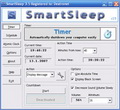
SmartSleep, güçlü bir bilgisayar kapatma ve kapatma planlama aracıdır. Bilgisayarı belirtilen zamanda kapatmak üzere tasarlanmıştır. Dilerseniz zamanlanmış görevler oluşturarak örneğin her Pazar saat 18:00'de bilgisayarınızın otomatik olarak kapatılmasını sağlayabilirsiniz. SmartSleep, bundan çok daha fazlasını da yapabilir.
Program hakkındaki yorumlarınız ve bilgi alışverişi için: CHIP Online Forum
SmartSleep, bu işlemleri destekler: Kapatma, kullanıcı oturumu kapatma, yeniden başlatma, siyah ekran, hazırda bekletme, askıya alma, dosya çalıştırma ve mesaj görüntüleme. Ancak hepsi bu kadar da değil. SmartSleep, atom saati eşitleme gibi bir çok ek işlev de sunar.
Sistem Gereksinimleri:
Windows 7/ Vista/ XP/ 2000
Yayıncı:
DextronetWeb sayfası:
http://www.dextronet.com/smartsleepDosya boyutu:
2.69 MB
Fiyat:
$19.95
Öne çıkan programlar
Organize all your tasks and notes in one place. Getting organized has never been easier (or more fun!). Discover why thousands around the world can't imagine their lives without Swift To-Do List.
GIVEAWAY download basket




SmartSleep üzerine yorumlar
Please add a comment explaining the reason behind your vote.

Why do people vote thumbs down just because it is a program they don't want?
How about this, if you don't want the program, don't vote. It gives people and developers a inaccurate feedback.
At 3:01 there was already a thumbs down vote. Now there is no way you had time to download, install and use the program long enough to rate it.

This program previously appeared back in 2007 - http://www.giveawayoftheday.com/smartsleep/
I think some people read the first sentence of the description and in a rush to comment post without even trying the software, or looking at the program website to see if there is something they may have missed.
I remember this program last time quite well. The use I found for it was on a laptop beside my bed. At whatever time I decided to go to bed, I could easily have my laptop play some music from a playlist, for 30 minutes. The volume would gradually decrease until the countdown timer had elapsed, and my laptop would also be put into standby/sleep mode.
Sure I could write scripts and batch files - play with the task scheduler, even find some plugins for my media player to allow the volume to be reduced over a custom time period.... but this already had it there. Simple. Software doesn't always have to be amazingly complicated or do something that is otherwise impossible. This app was just very convenient.
There are lots of other options that this program can handle - but at it's essence, it is a simple scheduler with a useful take on the idea of how your PC could be shut down. I like it.
Or you can use scheduled tasks that is built in to Windows.
If you don't know what scheduled tasks are, you can search help and it will tell you exactly how to do the things that they mention this program does.
Oh well...
Well, maybe it's time to have two user ratings.
One for those who actually installed the softwrare and did or didn't like it, and one for those who are not planning to install the software but like or dislike the particular kind of software.
Maybe it's time for us, users, to be given the opportunity to suggest the kind of software we would like to see in the near future.
Don't get me wrong. I thing GAOTD team is doing a superb job and this is one of my favorite sites. And through the years I have downloaded many of the giveaways.
Visiting the site every day to see what free software-surprise awaits me is a fun process. Reading the reviews and the opinions about the software of the day, is an equally fun and very useful and sometimes very educational proccess.
It would be great however, if there was a way to share our thoughs with the developers and the software companies, in order to give them an idea about what we like to see in the future...
Moderator comment: The GOTD forums is the place to discuss such a thing (Suggestions for the site & the Giveaway Team). The comments on this page should specifically relate to the daily giveaway. Suggestions and recommendations for future giveaways have a forum topic dedicated for that purpose. http://www.giveawayoftheday.com/forums/topic/1450
#2 perhaps we have already tried this, its not new its been around a for while
Günlük iPhone önerileri »





Günlük Android önerileri »






Çok güzel bir program işimi fazlasıyla gördü. teşekkürler
Save | Cancel
Konu kaymış gibi görünüyor indirenler nasıl anlaılır biçimdemi pratikmi onu yazsınlar
Save | Cancel
Evet ya, kusura bakma; yanlış anlamışım sitesinde yazılanı. Programı indirip kurunca otomatik Pc açma özelliğini bulamadım. Dilediğin bir saatte dilediğin bir dosyayı, programı açma özelliği var. Bununla şarkıyı açmasına ayarladım, PCyi kapattım bekledim malesef tık yok. Yukarıda arkadaşın dediği gibi Bios'tan ben çok otomatik açmaya ayarladım PC'mi ama zannedersen laptopların Biosunda bu özellik yok.
Save | Cancel
Bu programın ingilizce olan web sayfasını inceledim, burda yazılmamış ama alarm gibi bilgisayarı otomatik açma özelliği de var. Gerçekten güzel özelliklere sahip bir program :)
Save | Cancel
O bahsettiğin programla olacak iş değil.Ancak bilgisayarın bios kısmında wake up gibi bir seçenek varsa ayarladığın bir saatte kendiliğinden açılmasını sağlayabilirsin.
Save | Cancel
"bu programın tam tersini yapan bildiğiniz program var mı?"
http://www.korkma.net/program-anlatimlari/31105-auto-poweron-amp-shutdown-bilgisayari-otomatik-acma-bilgisayari-otomatik-kapama.html
burda ki program iddia ediyor. deneyebilirsiniz.
Save | Cancel
öyle bir program yok onu ancak bıos ayarıyla yapmak mümkün...
Save | Cancel
Sayın Ahmet Manav..
Win 7 yi deneyin :DD
Save | Cancel
bu programın tam tersini yapan bildiğiniz program var mı?
Save | Cancel