Her gün sizlere, piyasa değeri onlarca dolar olan bir programı tamamen ücretsiz olarak sunuyoruz!
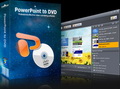
Giveaway of the day — mediAvatar PowerPoint to DVD Personal
mediAvatar PowerPoint to DVD Personal giveaway olarak 4 Aralık 2010 tarihinde sunulmuştu

mediAvatar PowerPoint to DVD, neredeyse tüm biçimlerdeki Microsoft Powerpoint (PPT) sunumlarını DVD diske, DVD klasörlerine veya ISO imaj dosyalarına dönüştürebilir. Bu sayede sunumlarnızı değişikliklere karşı koruyabilir, ürün veya şirket tanıtımı yapmak amaçlı istediğiniz kişiyle paylaşabilirsiniz.
Program hakkındaki yorumlarınız ve bilgi alışverişi için: CHIP Online Forum
Anahtar özellikler:
- Düzinelerce menü arasından istediğinizi seçerek kendi menünüzü oluşturun, arka plan müziği ve resimleri ekleyin
- Kendi yorumlarınızı ekleyin, arka plan müziği ve filigran ekleyin, PPT DVD'nizin çalma modunu ayarlayın
- Hedef DVD'de orijinal PPT'nin ses /video / efektler gibi tüm işlevleri korunur
- Tüm PPT dosyası için ve her slayt için arka plan müziği ayarlayın
- İki DVD oynatma modu sunulur: elle ve otomatik. 'Elle' modunda isediğiniz slayta gitmeniz mümkündür, 'Otomatik' modda ise sunumlar otomatik olarak yürütülür
Rehearse
Sistem Gereksinimleri:
Windows XP (SP2 or later)/ Vista/ 7; Recordable DVD drive
Yayıncı:
mediAvatar Software StudioWeb sayfası:
www.mediavideoconverter.comDosya boyutu:
100 MB
Fiyat:
$55.99
Öne çıkan programlar
Offering the most ideal way to preserve and share your PowerPoint presentations (PPTs) in a totally different way, mediAvatar PowerPoint to Video Converter can turn Microsoft PowerPoint files into video files in high-definition (HD) video formats at full-HD 1080p resolution or, general video formats including AVI, H.264, WMV, MP4, MOV, etc. Installing Microsoft PowerPoint is not required.
Protect DVD discs from constant scratching by backing them up as digital files, watch movies without having to bring stacks of discs. With mediAvatar DVD Converter it’s now possible to rip and convert DVD movies to AVI, MPEG, WMV, DivX, MP4, H.264/MPEG-4 AVC, RM, MOV, XviD, 3GP, MP3, WMA, WAV, RA, M4A, AAC, AC3, OGG, and more other video and audio formats and watch them conveniently on any multimedia device, be it a mobile phone, gaming console, mini video player, iPod, iPhone, portable gaming devices and others.
mediAvatar iPad Software Suite provides the perfect solution to backup iPad files to PC or iTunes, transfer movies, songs and photos from PC to iPad without using iTunes, as well as convert DVDs/CDs and various video/audio format files to iPad videos/music then transfer them to iPad. All iPad, iPhone and iPod models are supported.
mediAvatar Video Converter supports decoding and encoding almost all high-definition and standard-definition video formats as well as audio formats, enabling the playability on all popular players. Meanwhile, it provides different video editing features (incl. clip, merge, split, add transitions/soundtracks/subtitles/watermarks, adjust image effects, etc.) to customize the outputted video files.
mediAvatar YouTube Video Converter provides a one-step “downloading + converting” solution to download and convert YouTube videos to other video formats for playback on your multimedia devices like iPod, iPhone, Apple TV, PSP, PS3, Zune, Blackberry, and 3GP mobile phones, with the support for the latest YouTube site. A built-in YouTube video browser makes it easier to browse, search and download YouTube videos.
GIVEAWAY download basket




mediAvatar PowerPoint to DVD Personal üzerine yorumlar
Please add a comment explaining the reason behind your vote.

The Good
* Straightforward and easy to use.
* Supports the conversion of .PPT, .PPTX, .PPTM, .PPSX, .PPS, .PPSM, .POTX, .POTM, and .POT presentation formats. (They are all Microsoft Office formats.)
* Retains original slide transition and inter-slide event effects.
* Users can convert multiple presentations to one DVD.
* Can output directly onto a disc (i.e. burn the presentations), create DVD folder, or create an ISO.
* Automatically builds a DVD menu, allowing users to select from 30 different menu templates.
* Allows users to add custom background audio tracks and watermarks (text and image).
* Users can record custom commentary for presentations.
* Allows users to play presentations (once they have been made into DVDs) "automatically" or "manually".
* Can automatically shutdown, stand by, or hibernate computer or close the program when conversions have finished.
The Bad
* Output quality is lacking; noticeable difference in quality between input presentation and output DVD.
* Requires users to have Microsoft PowerPoint installed.
* Gives users the option to select how long (how many seconds) a slide is displayed in total, but does not give users the option to set how long to wait between events (text, images, etc.) within a slide.
For final verdict, recommendations, and full review please click here.

You don't need Microsoft PowerPoint installed, but you can use the free verseon of Openoffice instead. It works perfect.
Ad.9.
OpenOffice and Microsoft PowerPoint compatibility
DISCLAMER: I haven't downloaded today's program yet [it's huge & restarts], but what I am saying below is true to the most programs available on the Internet today.
I think that it was about the Microsoft PowerPoint presentation format [.PPT]. This format is supported by both: OpenOffice (after specifying this format when saving) and the Microsoft PowerPoint as the native format.
The main problem is when someone is trying to save the OpenOffice presentation using the default format [.ODP] or [.SDD]. This format is simply different than [.PPT] and was NOT supported natively by most of Microsoft PowerPoint editions.
So when someone is trying to load the [.ODP] file using Microsoft PowerPoint or tools like today's then he is getting into troubles. On the other hand he can open OpenOffice, re-save/export the presentation using the [.PPT] format & open this [.PPT] file in MS PowerPoint or in another utility. Then all tools should work [with minor bug possibles, but it should at least work].
So this talks everything about why it DOES NOT SUPPORT OpenOffice AND can read files PRODUCED BY OpenOffice.
Hope I have helped some ;-)
Have a nice day ;-)
mediAvatar PowerPoint to DVD Personal in a nutshell seems a very ambitious front end to several other apps, including the *nix-based DVD Author. The *nix-based part isn't necessarily bad, but when you have to use cygwin1.dll etc. it just doesn't always work as smoothly as if you have a native Windows app. The app itself is OK in that it converts a PowerPoint file to one, longer video, then packages that video in a bit of a non-standard DVD layout. Menu options are *very* rudimentary, & to be honest I'd suggest considering pulling your new video out of the DVD layout it creates [e.g. use PgcDemux], & using that with something else to do the DVD proper... it simply isn't up the level of *any* pay-ware DVD authoring apps I've ever seen [including the very cheapest ones], & it's only claim to fame is converting PowerPoint files to mpg2 video.
The setup.exe file includes both the PowerPoint viewer & the viewer 2007 SP2 installs, so you don't need PowerPoint itself to convert presentations -- they do however have quite an impact on Windows, including fonts, C/C++ runtime libraries etc... the whole thing, mediAvatar PowerPoint to DVD Personal including the viewer [*IF* you needed the viewer] adds up to almost 1.3k files, with almost 7k new registry entries. mediAvatar PowerPoint to DVD Personal itself takes up ~104 MB with 993 files in 72 folders.
When you Google/Bing on PowerPoint to DVD or PowerPoint to video you don't get a lot of info other than various converter ads &/or endorsements. Use Google on the Microsoft.com site & it's a bit better, but there's still not a lot of info to be had. I don't know if there's just not a lot of call for this sort of thing, or if it's just something that's been ignored or skipped over, but unfortunately for this particular conversion in many respects you're on your own. Personally I'd say approach it as a slideshow [if your presentation allows], & you'll have tools, guides, & on-line advice available. If your presentation has animations so stills won't work, turn it into video, then use that the way you would any other video for DVD or Blu-Ray -- again there's tools, guides, etc. you can easily find on-line. mediAvatar PowerPoint to DVD Personal is an alternative to to do that, to convert ppt to mpg2, & it's here, now, but there are conversion &/or screen capture apps that can do better.
If you don't have PowerPoint, &/or if you want to explore your options a bit, maybe this will help?...
There are a couple of approaches you can use to turn PowerPoint or any presentation into video, several video formats to choose from, you can put the video online or on a CD/DVD/BD disc, & you can make a standard video DVD or Blu-Ray disc. A Video DVD &/or Blu-Ray disc can optionally work the same as giving a presentation live, clicking to advance from one slide to the next, have further options like a menu for each slide, groups of slides and so on. The 1st step is to plan everything out -- this can save a LOT of headaches [not to mention Google/Bing searches] later, and at many stages it can be impossible to just switch apps mid-stream. Once you know how you want your finished project to look, you can work backwards, determining &/or listing the steps it'll take to get there. This also sets the boundaries for your project, & lets you re-define it if need be... example 1) DVDs have limits, like the one that says you can have 99 chapters [or individual slides if they're set up as chapters], and you can only beat that by using certain software &/or techniques, so you either go that route or trim your presentation as necessary to have less than 99 slides, or don't use individual slides & so on; example 2) Blu-Ray takes most limits on what you can do off the table, substituting a really, Really big one -- the really neat stuff takes expertise writing Java, & while there is one free-ware project, the software Hollywood uses costs many thousands of dollars, with nothing in between the two extremes [& you usually still need to know Java] -- IOW if you want to use video Blu-Ray for HD, more than likely you'll want to keep things simple; example 3) Standard video DVD & Blu-Ray formats are designed for movies, not presentations, so if your target audience isn't limited to using a DVD or Blu-Ray player, don't use video DVD or Blu-Ray, but something along the lines of Flash or Autoplay Menu Studio or even Windows Media Format [there are an awful lot of options built into Windows Media that most have never seen taken advantage of].
Once you've set your limits or boundaries, & gotten a good idea of how your presentation will work in the final *video* form, you can either export or screen capture individual slides, or record your presentation as it's playing -- you can use screen capture, or with the many DVDR & DVR boxes out there relatively cheap, it can be easier [& often as good if not better quality] to record the video out from a PC/laptop, either direct from a plug on your PC/laptop or using a cheap [I've seen them <$20] adapter. Whether it's done internally in software or using your PC's/laptop's graphics hardware for display, images of your slides are going to be *captured* & *that's* encoded to video -- there is no direct conversion on the order of .rtf to text or .doc. Regardless the quality & variety of special FX (or transitions) your presentation software has, you can most often do better in many video editing apps, plus you can add a slight amount of blur to make text & sharp graphics look better playing from a video DVD -- DVDs don't have the resolution to make sharp lines always look sharp, so any time text is used in pro DVD rez video it's shadowed & blurred, same as in the commercials you see on TV. For that reason if/when possible you can be better off exporting/screen-capping individual slides, then plugging them into a video editing app or slideshow creation software [e.g. DVD slideshow GUI http://goo.gl/GdyJP ]. And if there's a chance your presentation is going to be shown on a regular TV, don't forget to check if the colors are all TV *legal* -- something you can do in many image &/or video editors -- or you could be in for a bit of a surprise. [You might come across references to PC vs. TV colorspaces -- in my experience no need to worry with most all current DVD players (they'll fix it), & as reducing the color range from PC to TV can have nasty results if not performed right, IMHO it's just not worth it.] That said, if you plan by working backwards, & know you're putting your presentation to video *before* you create the presentation, it's Much better to create your slides etc. with DVD or Blu-Ray in mind, e.g. using higher def images for HD, using only TV legal colors, using the TV color space or range, feathering text/graphics + adding shadows etc...
I do want to emphasize to always remember that audio & video tracks are separate, even if/when they're joined in the same file container. At any time they can be split apart & joined back together again. Likewise the VOB files a DVD uses [&/or the .m2ts on a Blu-Ray] can be split apart or easily created from the separate audio & video files inside. When & where you do something like recording narration is a matter of convenience or preference or practicality, but it's usually best done when your video's completed -- that's why recording to a DVDR/DVR can work (you want the recorded/encoded video file that you'll add audio to later), & why in a video editor you might pre-render (or render & import that into a new project). Other than that to a very great extent it's a matter of your own ambition. TO give a few ideas, Video DVDs can have playlists, which are lists of individual video titles that play in whatever order you choose, you can have many more than one, & you can use scripts to determine what plays when, or what's even offered by having several menus. Your slides can be menus, complete with hidden or visible buttons, & use video transitions between them. Your slides can be individual videos themselves, or chapters in a longer video, or just be in a single video that's a recording of your presentation, & any of those can have buttons that are visible or hidden. A video title on a DVD can have the option to skip scenes [e.g. rated/unrated versions of movie DVD], &/or have switchable audio tracks, &/or angles, & subs don't have to be text [e.g. some anime DVDs]. And you can combine all of that stuff together in one video DVD, often fairly easily. What you want to avoid IMHO is anything that looks *canned*, that gives the impression you just used some app's defaults & put as little work into it as possible... you might have spent many a sleepless night toiling away, but if the 1st thing anyone sees is a menu that looks totally boring & unoriginal, a lot of the time & effort you put in can be wasted, right then & there. IMHO it's better to skip a 1st menu rather than have one that gives the wrong impression -- better to leave something out than to do it poorly -- & Much better to focus on content than "Gee whiz, look what I can do" FX... otherwise, regardless what friends & family tell you, few are going to take your work seriously.
Günlük iPhone önerileri »





Günlük Android önerileri »






Bilgiler için teşekkürler atalım bir köşeye dursun ilerde illaki bir yerde lazım olacaktır.
Save | Cancel
Veysel kardeş senin emlakçılık sunumları için birebir :)
yalnız dosya dosya taramadım.Benim ilgi alanımda olmadığı için doğrusu üşendim. :)Sana bahsettiğim projeyi tamamladım.Uğradığında alırsın.
Genele hitaben;
İlerde kullanım için;
Tempten aldığınız setup ve readmede verilen serial bilgileri yeterli görünüyor.İnternetten serial aktivasyonu yapmadığı için sorun çıkacağını sanmam.Sorun çıkarsa sistem tarihini bu günün tarihine ayarlar öyle kurarsınız.Fakat yinede aktifleştirdikden sonra regden anahtarı yedeklemek isteyenler yedekleyebilirler.
.
Save | Cancel