Her gün sizlere, piyasa değeri onlarca dolar olan bir programı tamamen ücretsiz olarak sunuyoruz!
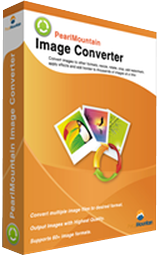
Giveaway of the day — PearlMountain Image Converter 1.2.8
PearlMountain Image Converter 1.2.8 giveaway olarak 12 Nisan 2016 tarihinde sunulmuştu

PearlMountain Image Converter resimlerinizi diğer formatlara dönütüren, yeniden boyutlandıran, kırpan, filigran, çerçeve ve efektler ekleyen bir fotoğraf dönüştürücüsü ve çoklu dönüştürücüdür.
Sistem Gereksinimleri:
Windows 2000/ XP/ Vista/ 7/ 8/ 10; CPU: Intel Pentium IV 1.0GHz, AMD Athlon XP (equivalent) or higher recommended; Memory: 256 MB (512 MB or higher recommended); Hard Disk: 150 MB (200 MB or higher recommended)
Yayıncı:
Pearl MountainWeb sayfası:
http://www.pearlmountainsoft.com/pearlmountain-image-converter/Dosya boyutu:
9.9 MB
Fiyat:
$39.90
Öne çıkan programlar
Picture Collage Maker is easy to use and allows anyone from novices to professional photography designers to create eye-catching photo collages on Windows. With just a few clicks, they can create collages, scrapbooks, posters, greeting cards, invitations, calendars, and any other type of season greetings you might imagine.
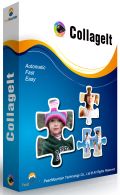
CollageIt is an easy-to-use photo collage maker for Mac OSX & Windows, which makes collage automatically. In a matter of seconds, this collage software can turn any ordinary photos into impressive collages.
PearlMountain Image Converter 1.2.8 üzerine yorumlar
Please add a comment explaining the reason behind your vote.

Often when there is a simple registration procedure the program itself is often easy to use.
This didn't happen in this case; a pleasant and simple looking interface that was surprisingly clunky in its use, that is it didn't behave as I expected it to when selecting image, once I got over over this initial confusion it wasn't too bad.
Tested a few of the functions available, Corrections, small change in the sliders cause large changes in the image and the sharp function was pretty horrendous in what it output.
There's nothing subtle and there was no finesse to this program, certainly nothing like I would expect that such a high price.
A small collection of free programs will do everything this one can and most of them do it better.

Salvia, After reading your comments I tried the program again and played with all the effects and sliders. Other than finding the sliders needed to be moved very gently, all the effects worked as I expected and the resulting photos were very good. I am using a Win 10/64 system and am very happy with the prog. I will agree that it seems a bit over priced normally.
4BunnyRabbits,
Thanks, recently we have had some superb image manipulation programs on this site, reasonably priced for what they do and this is the competition this developer is facing.
For instance Zoner, not a program I have been too keen on in the past, is now a really nice piece of work is $99 if you pay full price, just over twice as much as today's but with 20 times the functionality and ease of use.
To me it looks like today's developer trying to make a program that does a number of functions that a beginner can use, that way they justify the price. It fails miserably this aspect it doesn't do the work well nor is it easy-to-use.
Uninstalling my copy as it doesn't perform well enough in any of its functions.
Image Converter 1.2.8 is very limited in its range of formats. ReaConverter Lite offers similar formats for free, but their Standard version converts from 589 formats to an adequate range of 54 file formats at discount price of $37.50 (if you look for the discount codes).
Both vendors, in my opinion, are too pricey as I can convert files using other full editing software in the SAVE AS or EXPORT TO mode.
Missing from today's free offer are formats such as EPS, DRW, CGM,Ai,SWG,SWF,WMF and RAW formats. So to sum it up: It is a handy converter to have in my already overloaded toolbox but totally inadequate for my needs. I will keep it as it does not use much memory or resources.
DenisX,
If you want to overload that toolbox even more, XnView is "provided as FREEWARE (NO Adware, NO Spyware) for private or educational use (including non-profit organizations).", & supports 500+ formats. There are 3 packages, one with no plug-ins or add-ons, one with just a few, & one with everything, & all 3 are available with or without an installer. There's also a version at portableapps[.]com . xnview[.]com
Thank you Salvia for your excellent reviews and comments. I am sure they are also much appreciated by other visitors to this site.
As far as today's giveaway is concerned, I'd rather recommend an amazing-and free program-called Fastone Image Viewer 5.5, which does what this giveaway does and much much more, which includes functions like cloning, healing, red eye removal, color adjustemnts, lossless jpg rotation, to mention just a few of them.
There are numerous youtube tutorials about Fastone Image Viewer.
Its smaller brother-Fastone Photo Resizer-allows users to convert, resize,crop, rotate, change color depth of images, batch rename, batch watermark, and perform other operations, just make sure to go to advanced options to access some of these functions.
Just my 2 cents.
Cheers,
consuela
Günlük iPhone önerileri »




Günlük Android önerileri »






kurduktan sonra resimlere sağ tıklayınca windows gezgini durduruldu hatası veriyor
Save | Cancel