Her gün sizlere, piyasa değeri onlarca dolar olan bir programı tamamen ücretsiz olarak sunuyoruz!
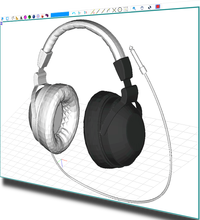
Giveaway of the day — AutoQ3D CAD 5.12
AutoQ3D CAD 5.12 giveaway olarak 12 Nisan 2017 tarihinde sunulmuştu

AutoQ3D CAD for Windows 2D ve 3D CAD uygulamasıdır. Çizimlerinizi, tasarımlarınızı yaratma, düzenleme ve paylaşmanızı sağlar.
Şablon Görüntüleri
·Çizimlerinizi farklı görüş açılarından izleyin.
·3D modellerinizi ortogonal ve izometrik görüntüde izleyin.
·3D çizimlerinizi zoom, pan ve döndürme yaparak görüntüleyin.
·Şablonlar: üst, ön, sağ, sol, izometrik.
Çizim Araçları
·Çizgi, küre, kutu ve dahası ölçülendirme şekilleri ile çizim yapın.
·2D çizimlerinizi yüzeylere dönüştürün.
·Araçlar: line, circle, rectangle, arc, polygon, text, triangles, box, sphere, camera, region, extrude, revolve.
Değiştirme Araçları
·3D modellerinizi temel operasyonlarla düzenleyin.
·Araçlar: erase, snapline, round, trim, fillet, offset, extend, explode, slice, texture uv, normals.
Tutturma Araçları
·Model yaratma ve değiştirme işlemlerinde artan işlevsellik.
·Orta nokta ve son noktadan tutturma.
·Araçlar: end-point, mid-point, nearest, intersection, center, grid.
Grup Araçları
·3D modellerle rahat çalışmak için grup seçeneği.
·Gruplama fonksiyonu pek çok ögeyi hep beraber düzenlemek için faydalı bir fonksiyondur.
Düzenleme Araçları
·Edit Tools: move, scale, stretch, rotate, array, mirror.
Ve dahası...
Sistem Gereksinimleri:
Windows 7 and later
Yayıncı:
AutoQ3D TeamWeb sayfası:
http://www.autoq3d.comDosya boyutu:
1.7 MB
Fiyat:
$30.00
Öne çıkan programlar

FullKeys Keyboard is a keyboard that can be customized to support 4 different layouts sizes with a numeric keyboard. iTunes Store link
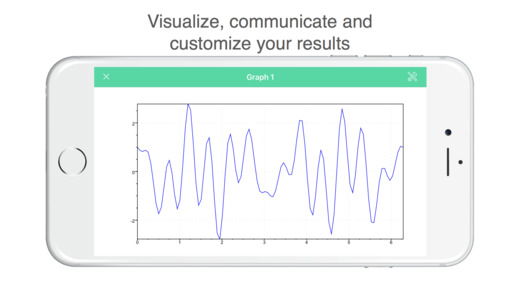
Math-c is a light and simple math script application and interactive environment for mathematical calculation, programming, plotting and image processing. Features • It allows you to create nested structures and script programs • It allows you to use functions for linear algebra. • It provides built-in graphics to analyze data and options to customize these plots.
Günlük iPhone önerileri »



Günlük Android önerileri »






AutoQ3D CAD 5.12 üzerine yorumlar
Please add a comment explaining the reason behind your vote.
Simple installation and registration, opens up to a two typical screen for this type of program.
A quick test in 2-D mode was found simple to use and again typical of this type of program.
If you need to do 3-D work in this type of program you need to view a number of tutorials. I have never had the patience or necessity to learn 3-D mode.
For those of a masochistic nature some pretty useful tutorials can be found at the following link:-
https://www.youtube.com/watch?v=yruPUj_61bw&list=PL3CEC0EC5BF058178&spfreload=10
If you're interested in 3-D mode for designing in your home freeware programs available are much simpler to use.
Search for IKEA planner; quite a number of years since I used this but when I did I found it very simple to use.
http://www.ikea.com/ms/en_AU/campaigns/kitchens/kitchen_planner.html
I believe other companies make equally easy to use software for this type of design.
Save | Cancel
Is there an export feature? If so, what formats are supported?
I find that the CAD native formats are not compatible with other 3D software; so for me, if .obj is not supported as an export option, I have no use for this. As in my limited experience native CAD formats cannot be converted except within these programs, if one does not have a CAD type software, using a model in those formats in other 3D software becomes impossible. The most common 3D format in the software I use is .obj, and from that I can convert to other formats as needed.
All that said, for measured models and specified tolerances, the CAD applications can be quite useful.
Save | Cancel
Install in a snap... S# in Read File.. Reg block comes forward and paste... it is that quick
Looked for reviews...not much there... lots of tutorials. Worth a try.
Save | Cancel