Her gün sizlere, piyasa değeri onlarca dolar olan bir programı tamamen ücretsiz olarak sunuyoruz!
Giveaway of the day — Project Dogwaffle Howler 8.2 (Special Edition)
Project Dogwaffle Howler 8.2 (Special Edition) giveaway olarak 13 Ocak 2014 tarihinde sunulmuştu
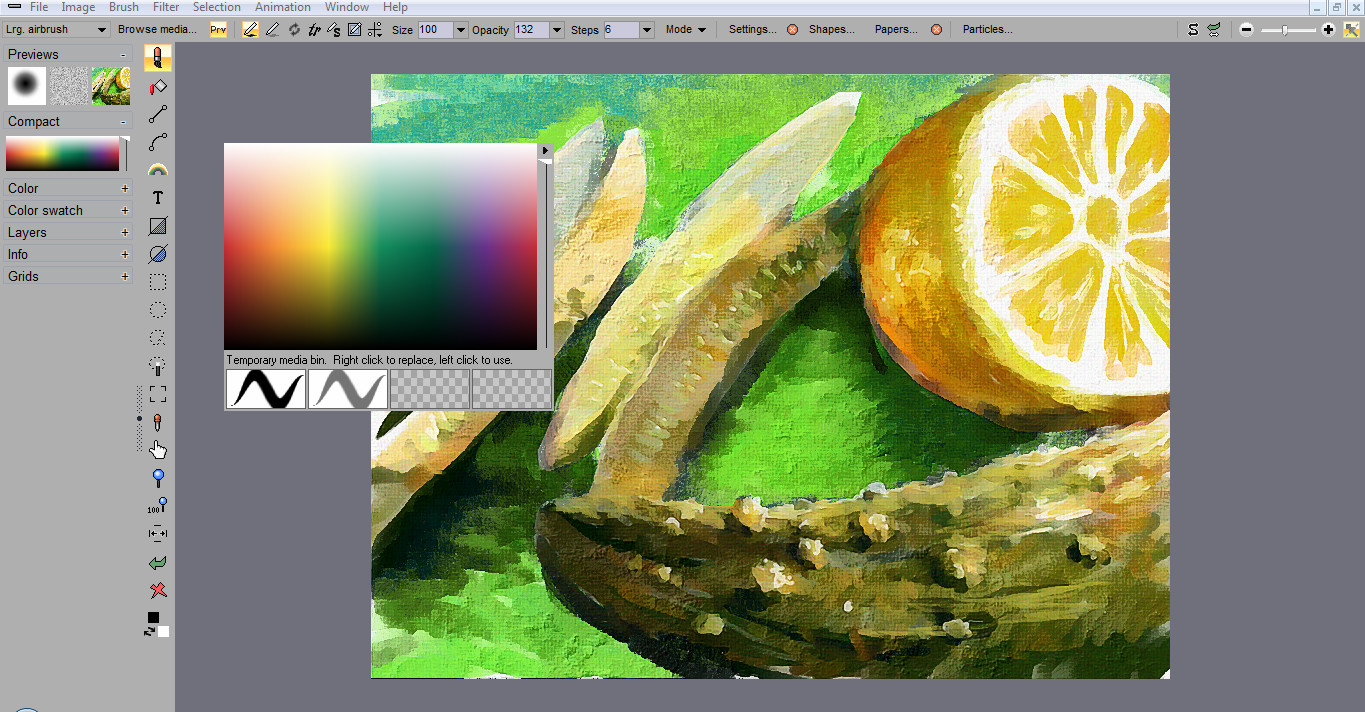
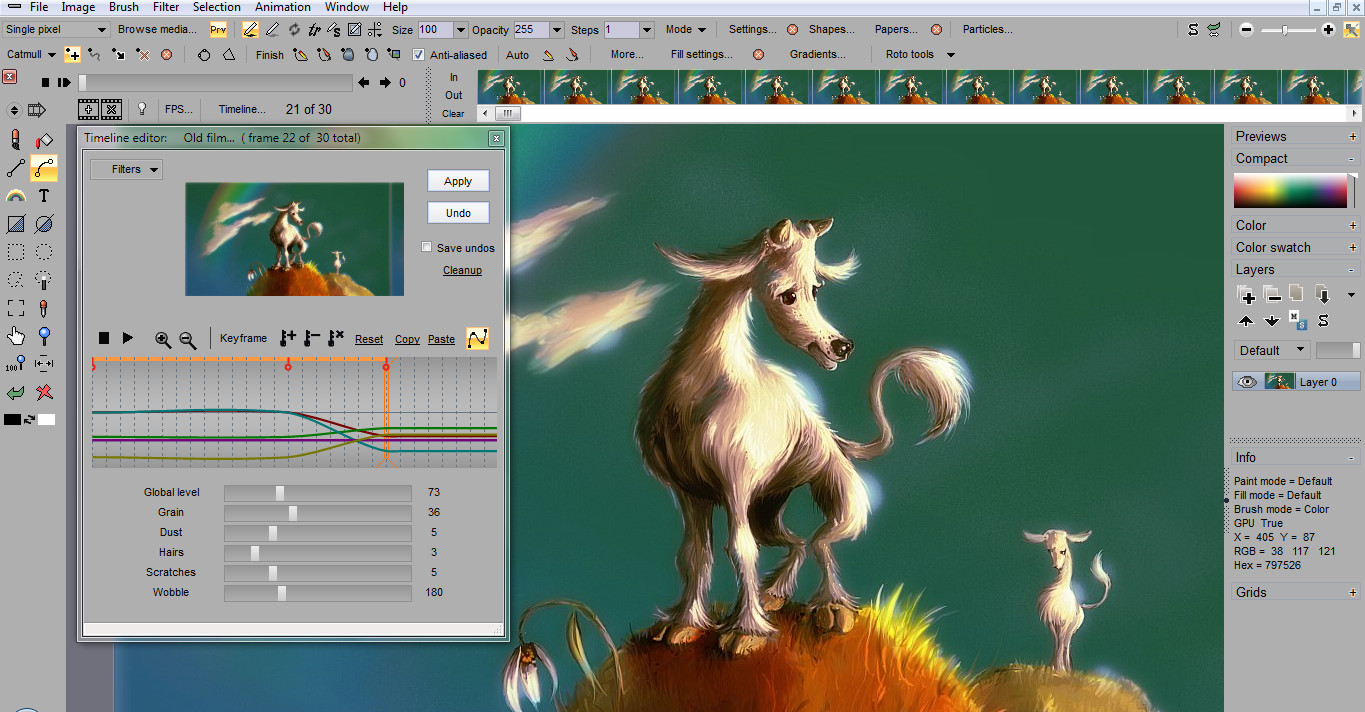
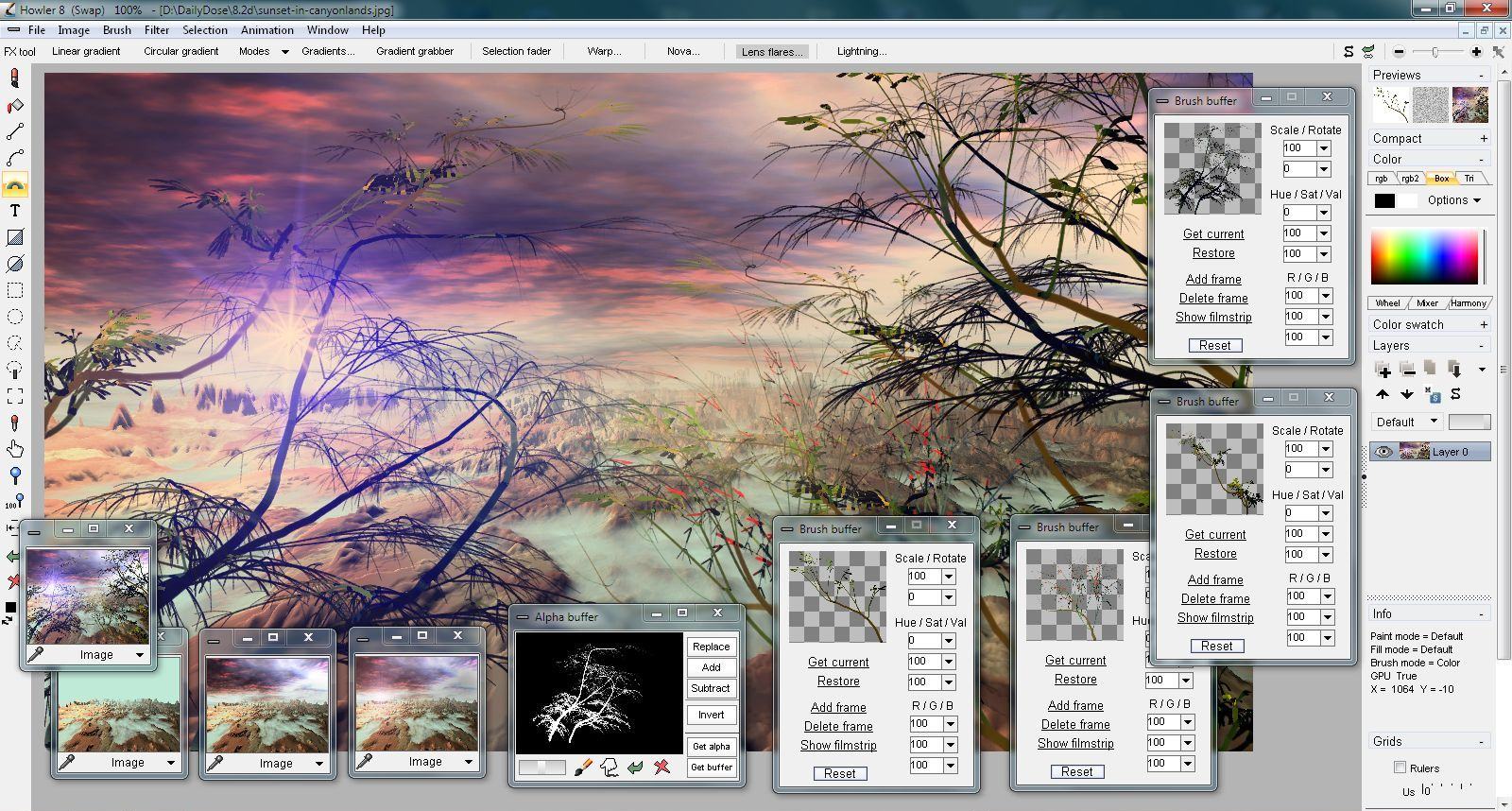
Başka programlara benzemeyen bir boyama programıdır. Project Dogwaffle Howler pek çok doğal medya stilleri yanı sıra yapraklandırma ve anime fırçalama gibi bazı benzersiz stillere de sahiptir. Tablet cihazlar tamamen desteklenmektedir.
Ayrıca program simetri boyama gibi gelişmiş boyama modlarına da sahiptir. Gerçek zamanlı ve tam ekran çalışan pek çok sayıda filtreye de sahiptir. Zaman akışı, kare akışı, toplu tarama, temizleme, pozlama sayfası, "rotoscoping" ve hareket takibi gibi video ve animasyon gereçlerine de sahiptir.
Aşağıdaki filtreler bu özel sürümde yer almamaktadır (fakat 120 fx filtresi mevcuttur):
- Değer bazlı kontrast
- Renk eğrisi düzenleyicisi
- Renk FX
- Renk/Ayar
- Art keskinleştirme
- Bokeh blur
- Radial blur
- Film grenleme
- Yumuşak kontrast geliştirmesi
- 3D Designer
- Küreselleştirme
- Woodcut
- Işıklandırma aracı
- Gökyüzü
- Mandelbrot
- Alfa zaman kesiti
- Kamera stabilizasyonu
- Anime eğrisi vuruşu
- Hareket tahmin modeli
Not: 8.2 versiyonundan Howler 9'a terfi için özel indirimden yararlanın.
Sistem Gereksinimleri:
Windows XP, Vista, 7 and 8; a processor that supports SSE2 as a minimum; at least 1 GHz or higher for best operation; .Net framework 4 is suggested but not required to operate (it is required for several plugins); at least 2 gigs of memory recommended or more (3 or more for Windows 8); 96 dpi screen dots per inch highly recommended
Yayıncı:
Project DogwaffleWeb sayfası:
http://www.thebest3d.com/howler/8/index.htmlDosya boyutu:
46.9 MB
Fiyat:
$99
GIVEAWAY download basket


Project Dogwaffle Howler 8.2 (Special Edition) üzerine yorumlar
Please add a comment explaining the reason behind your vote.
Installed an registered on a Win 8.1 64 bit system without problems. Requires .netframe.
I have to admit, that I never heard about this software and the company behind.I have a big wacom tablet and I paint from time to time with a well known program. Being a Corel customer from the very first beginning of that company. That said, I am a good tester with a basic knowledge of painting programs and no knowledge at all with this GiveAway.
The interface is quite familiar compared with other painting programs and you can start immediately your art work.
I would like to tell more about that, but ...
I changed the canvas, defined a large airbrush, defined colors and brush shape and began to draw. The result was the same as I have learned. I switched to ... and then the program didn't react any more.
Right click, left click, no information, moving the cursor stll works but is simply does not do anything, no paint, no erase, nada. I tried to undo the last steps, tried to get help.
As the last exit, I saved the picture to the default .tga file and reopened the file. O wonder, I could work again, brushes came back and colors and...
Well, this is the first paint program, where I completely got lost within a short test drawing. Not a good sign for the program, not I good sign for me either.
With the surely high learning curve I will stick to my well known painting program.
Thanks GOATD and Dogwaffle

Hubby first stumbled across PD Particles many years ago. It's a standalone VERY addictive brush package from Project Dogwaffle that's been included in Howler Pro since I think v7. Particles was given away once via GOTD, but now that it's bundled in Howler and Howler's been given away here twice in just the past half year, OMG this gets an unqualified thumbs up from both of us.
Don't claim that another package is "all you need" because that's just dumb, and don't ask if how it's different from something else because these packages all bring treats and different options to your canvas. Also dumb are the clowns giving thumbs down to #4 or anyone else praising this software, IMHO. It IS one of the best programs I've ever had the pleasure to use.
Only negative is that this is crippleware but beggars can't be choosers. I see one person wrote that they'd never heard of Project Dogwaffle so this type of advertising works for both the vendor and us users since it generates feedback they need to improve. E.G. - their web site has always been a confusing mess, but don't let that fool you, the software is awesome. I am not a pro so I can't explain why PSD support is limited (to one channel I think) but if you ask on the GOTD Forums, bet you can get a great answer and maybe even a workaround idea or two.
Although GIMP is a powerful free art package that should be in every artist's digital repertoir if only because it offers a free and compatible workarounds for alpha channels and virtual world viewers, I honestly don't know much about using GIMP as I have Photoshop plus Howler (thank you GOTD) plus Twisted Brush, all with steep learning curves but tons of jaw-dropping features you may only discover by viewing tutorials and video tuts on the software vendor's sites, YouTube and the many other art sites where people share their discoveries and techniques.
For example:
http://www.youtube.com/watch?v=uEYvD2tM1iY
http://www.youtube.com/watch?v=5sD_NSvcZ_k
http://www.youtube.com/watch?v=llgV4hpxy9o
Warning, if you have a predisposition to addictions, avoid Howler, Particles and Twisted Brush at all costs because I've lost a good half year of my life just playing with the options! :)) The addition of Orbicles to Particles (and Howler Pro) just adds to the fun.
I downloaded this last time it was offered, a truly superb piece of software that as a developer takes my breath away.
I love the way the brushes work and although they do extremely complicated things they are always visually attractive.
A quick way of testing if this program is of any use to you is to try a few.
Under file in the top menu bar you can choose a number of brushes, I suggest you try "Particles" and then maybe "Joshua Tree," under Watercolor you have some excellent brush washes, in fact a huge number of amazing brushes with which you can express yourself in a way no other program allows.
Go to their site as presented on this page you'll be able to view some of the work done by this program.
An incredible opportunity for anyone of an artistic nature to add to their arsenal of tools, get it while you can.
I've not had a good chance to test this yet but there are nearly 400 tutorial videos on the vendors Youtube channel, so hopefully that will allow folk to learn about all of the program features in a useful way.
Downloaded and installed OK on Windows 8.1 64bit. I've only dabbled with it for about 5 minutes but it really does seem to be a pretty comprehensive drawing program; a bit reminiscent of some of the drawing programs on the old ATARI ST ( yea I'm OLD!!). I'll certainly keep this and have a play with it.
On the down side on my system several of the items on the help menu- including the manual- don't work which is annoying. They open as a progamming list in notebook- maybe I can sort it out sometime but for now it's very much a matter of trial and error. Maybe there's a different route to the manual on the website but I had a look at that and it's very 'busy' and crowded and I didn't stay to investigate.
I'm a little unhappy that this offering goes a few steps down the crippleware concept whereby not everything works- ie. 14% of the filters in the full program. Part of the concept of this site as I understand it is to give the authors feedback on how well it works and some of it we can't try. Maybe a limited trial of the full program from within the GOTD one would be possible on a future occassion?
However, niggles to one side this looks good - give it a try. CNG
Günlük iPhone önerileri »




Günlük Android önerileri »



Program ; Daha önce hiç denememiş kullanıcılar için, geniş zamanda incenenip öyle karar verilmesi gereken bir program. Henüz detaylı inceleme fırsatım olmadığı için, Sadece jpg kaydını deneme fırsatım oldu. kayıt kalitesi için sorduğunda en yüksek (% 100)seçilirse, kayıt kalitesi fena değil. Ben şahsım olarak en yüksek zomlama miktarını biraz düşük buldum. (piksel ayrıntılarını daha rahat kontrol altında tutabilmek için)
Diğer özellik ve araçları hakkında pek birşey söyleyemiyorum. İlk izlenimlerime göre Aynı aracın farklı yerlerden erişimi var gibi gördüm. İnceleme için geniş zamanım olmadığı için yanılıyor olabilirim.
Programın kısıtlanmış Home versiyonu yerine gerçek kısıtlamasız olanı verilseydi inceleme fırsatım olduğunda etraflıca inceleyebilirdim.
Ben programı kaldırdım ve aldığım yedeğini sildim. (Fazla depolama alanım yok.)Fazladan depolama alanı olanlara, yedekleyip geniş zaman bulduklarında denemelerini öneririm.
Save | Cancel